Help Article
Lifecycle of a Report

Purpose
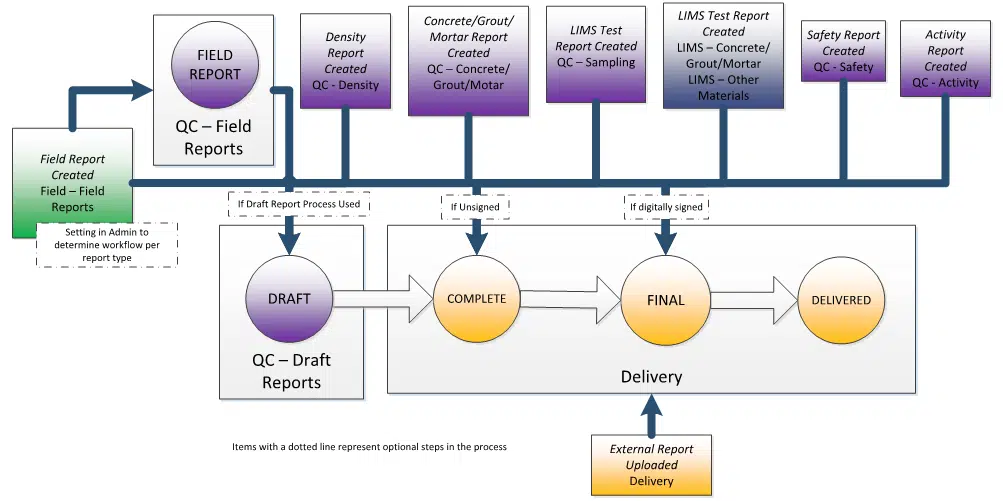
Once data has been collected in MetaField, users will create a report to consolidate this information and send it to a client. The diagram below describes some different ways reports can be created, and how they flow through the various statuses, including optional steps, like using Draft Reports.
Report Creation
Reports are typically created by a Project Manager in Review (QC) or a Lab Manager in the Lab (LIMS) module after data has been reviewed. When creating a report, you have three options:
- Create a Draft Report: Allows the report to go through an additional review cycle before it’s finalized and cleared for client delivery.
- Finalize a Report: Bypasses the draft review process and sends the report directly to Delivery, where it can be sent to the client.
- Finalize Report and Email: Finalizes the report and emails it to the predefined distribution list set up in the project specifications.
Creating draft reports is an optional step that's useful if you have incomplete information or want to finalize a report at a later time.


Field Reports
Field Reports are an exception to the standard Review (QC) reporting process. A Field user can create and send these reports directly from the Field module.
In Administration, you can configure how Field Reports are routed:
- Sent to the Field Reports area in Review (QC) for review and finalization, or
- Sent directly to Deliver module for client distribution
If a report is routed to Review (QC), it must be saved as either a draft or final report from within the Field Reports area before delivery.

Draft Reports
Draft Reports require an additional review before being finalized and sent to Deliver. When reviewing a draft in Review (QC), you have two options:
- Finalize: Approve the report and move it to Deliver. You can also sign the report at this time.
- Reject: Mark the report as rejected. It remains in Draft Reports and does not move to Deliver. Rejected reports can be manually deleted if needed.


Deliver (Delivery)
Reports in Deliver have one of four statuses:
- Complete: Report has not been digitally signed or delivered. (Reports signed at creation will not appear in this status.)
- Final: Report has been digitally signed but not yet delivered.
- Delivered: Report has been sent to the client. Both signed and unsigned reports can be marked as Delivered; the Signed By column indicates whether a delivered report has been signed.
- Consolidated: Report has been included on a consolidated report.

Reports created outside of MetaField can also be uploaded directly to the Deliver module.


Want to keep learning?
Click here for more how-to articles and MetaField guides. You can also access in-app guidance using the Help Desk!