Help Article
Lifecycle of a Work Order (Scheduling & Dispatch)

Scheduling & Dispatch Overview
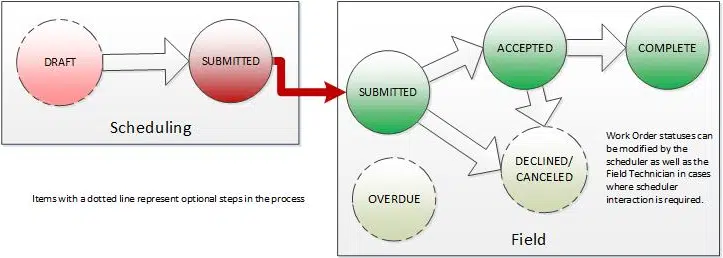
The Schedule module of MetaField allows schedulers to assign work orders to field technicians. A work order may include one or more tasks tied to a specific project in the field. The diagram below illustrates the typical lifecycle of a work order.
Schedule (Scheduling)
Schedulers create work orders in the Schedule module. While drafting, a work order can remain in Draft status until the scheduler is ready to release it. Once submitted, the assigned technician(s) can view the work order.
If a client cancels work before it begins, the scheduler can update the status to Canceled. Although schedulers can update other statuses (Complete, Declined, etc.) as needed.

Field
In Field > My Assignments, field staff can see their assigned work orders and:
- Accept a work order, moving it into Accepted status.
- Decline a work order if they are unable to complete it.
- Cancel onsite if conditions prevent the work from proceeding.
Schedulers can also decline or cancel on behalf of a technician (for example, if a technician is out sick or a client cancels directly with the office). In these cases, the work order remains visible in the schedule as Declined or Canceled for tracking purposes.
Declined or canceled work orders are removed from the technician’s assignment list but appear in the Schedule module under the appropriate queue, allowing schedulers to review and take the next steps. This restarts the scheduling process for that work order.


Completion & Tracking
When a technician finishes their assignment, they mark the work order as Complete.
If a work order’s scheduled end date and time pass without being marked complete, it will appear as Overdue in the Schedule module and calendar.

Want to keep learning?
Click here for more how-to articles and MetaField guides. You can also access in-app guidance using the Help Desk!